Mannequin and ghost-mannequin photos to on-model
A mannequin shot already contains the hardest thing to get right: how the garment sits on a body. Glammo AI keeps that geometry — folds, neckline, hem, drape — and replaces the form with a model, a scene, and a pose.
Try Glammo free with 10 credits. No card required.
Give the form a new setting
Creative study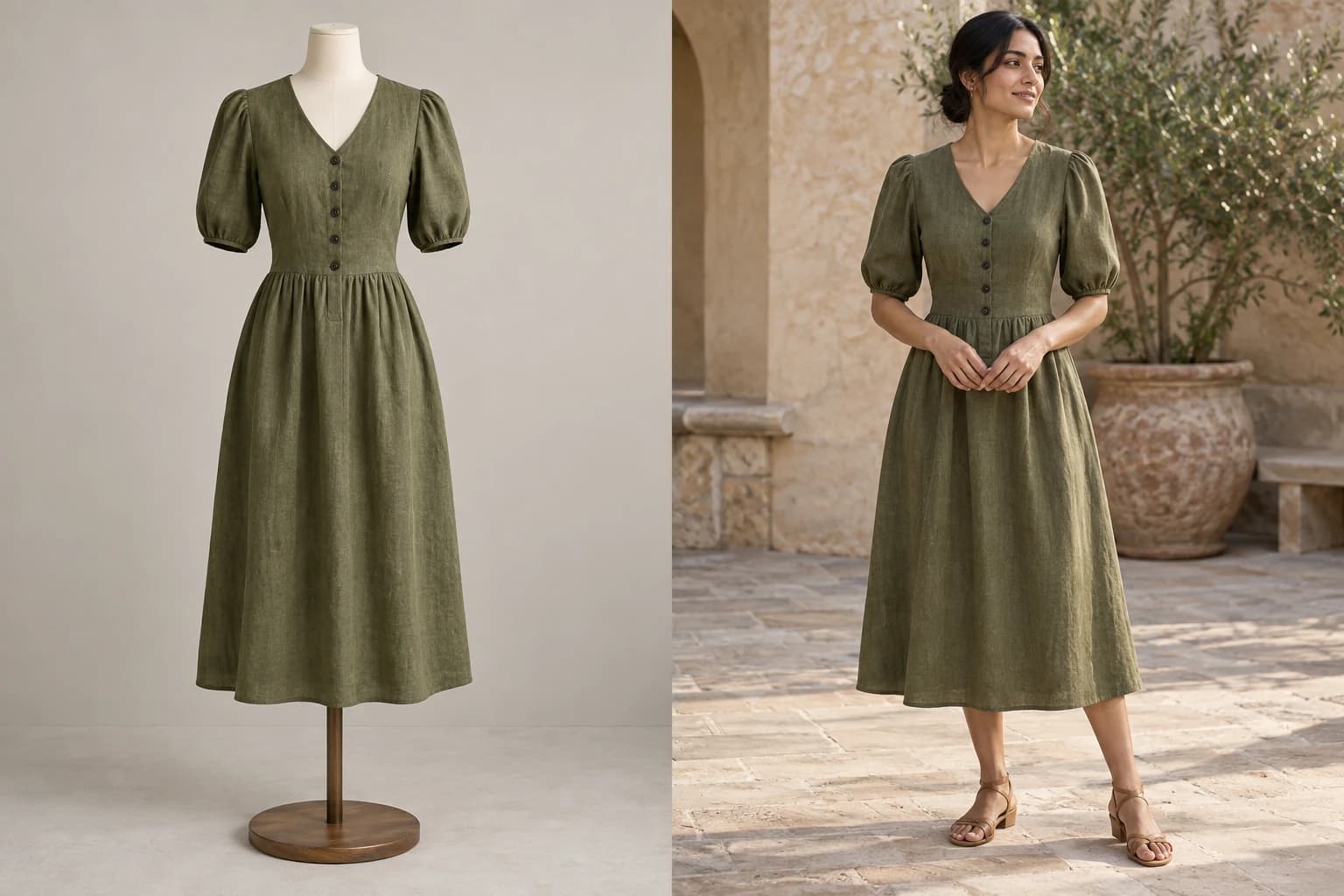
- 01Mannequin photo
- 02On-model direction
Why mannequin sources work so well
A flat lay leaves the drape to the imagination. A mannequin photo doesn't: the fabric is already worn, the shoulders already sit, the hem already falls. Glammo keeps all of that and changes only what's around it.
Ghost-mannequin shots — where the form has been edited out and the garment holds a hollow three-dimensional shape — work just as well. If the inside of the neck or a label shows in your photo, check the neckline in each image.
Because the garment is already worn, more angles open up than from a flat lay, side and back views included.
How it works
- 01
Upload the photo
In Studio, choose On-model shoot and add the photo. Mannequin, dress-form, and ghost-mannequin shots all work.
- 02
Pick the cast and set
Choose a model with the presentation and age that fits the garment, and a saved scene or an auto-generated one.
- 03
Generate
Product-page, lookbook, or social sets from the same photo, each keeping the garment's worn shape.
- 04
Compare and download
Check each frame against the mannequin photo. Download the ones you're happy with and add them to your store.
Good mannequin sources
The full form in frame
Head to hem for tops and dresses; waist to ankle for trousers.
Garment fully visible
No clips, pins, or tape holding the fit — they read as trims.
Straight seams, settled fabric
A quick steam before the shot removes wrinkles Glammo would otherwise preserve.
Neutral background and light
Studio white or grey keeps the silhouette edge clean.
What changes, what stays
| Stays as photographed | Changes to your direction |
|---|---|
| Garment colour, print, trim, neckline, hem | The person wearing it |
| The way it's worn: folds, drape, fit | Pose, within what the fit allows |
| Sleeve length and silhouette | Scene, light, and camera |
| Logos and labels on the garment | Crop and aspect ratio per channel |
Pose choice follows the source
A mannequin photo already shows how the garment sits on a body, so more poses open up than from a flat lay, side and back views included. The Studio greys out any pose a photo can't support.
Common questions
Does the garment shape stay exactly as it is on the mannequin?
As closely as the pose allows. A front view stays closest to your mannequin shot; poses with movement keep the fit while the body turns. Compare each image with your photo.
My ghost-mannequin photo shows the inner neck label. Is that a problem?
It can be. A visible label can sometimes carry into the image. Check the neckline of each image, or retouch the label out before you upload.
Can I keep the mannequin's exact pose?
Choose the front full-body pose for the closest match. Keeping the original pose is an option under Poses when every photo is on-model.
What if the garment is pinned or clipped at the back?
Pins and clips that show in the photo can be read as part of the garment. Hide them behind the form or crop them out before uploading.
Read next
Your next drop. Make it a moment.
Try Glammo free with 10 credits. No card required.