Product pages
How many photos does a clothing product page need?
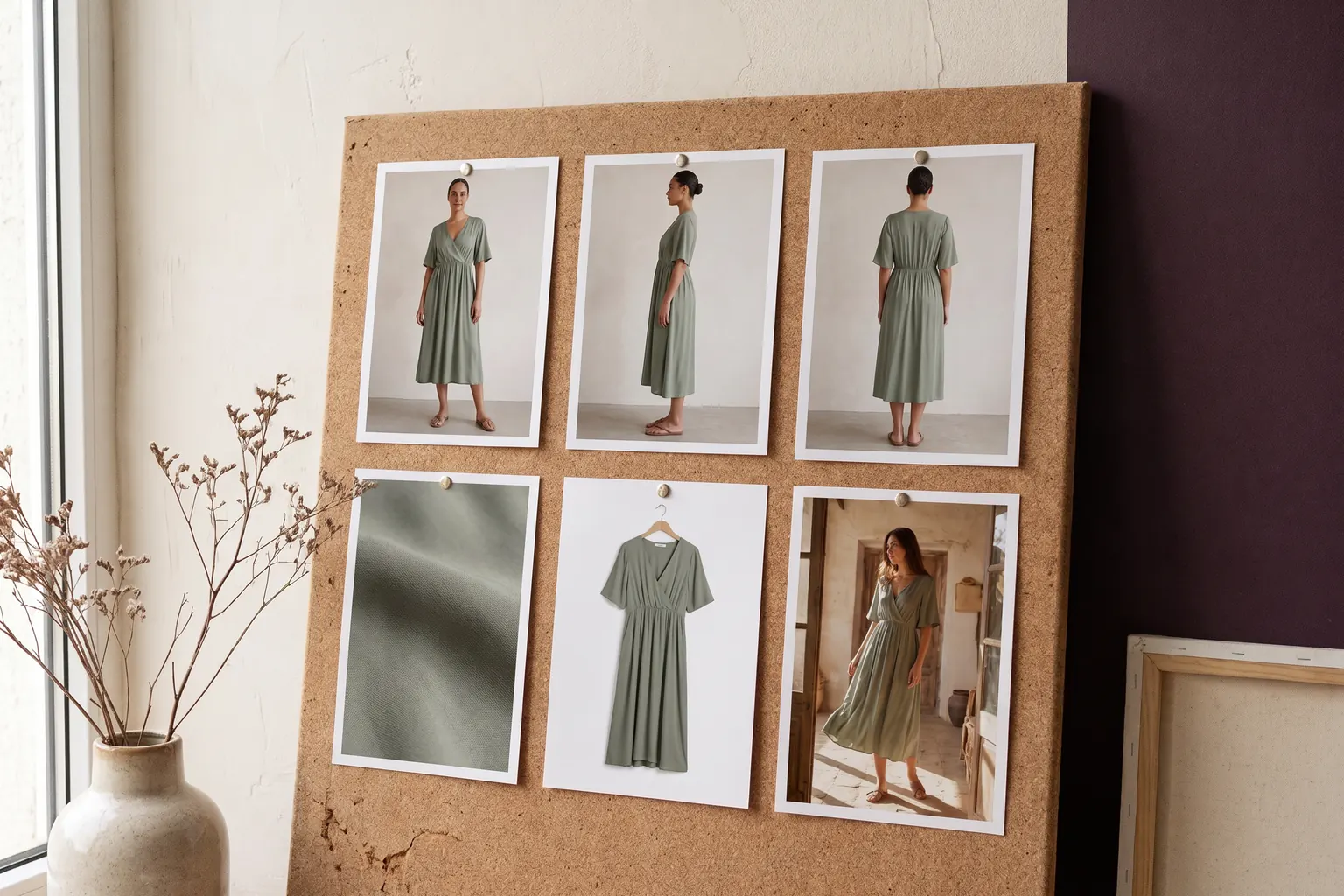
A clothing product page needs one photo for each question a shopper asks before buying: for most garments, a main image, another angle, the back, a close detail and a garment-only packshot. Glammo AI can make the on-model images and packshots in that set from your product photos; photograph the back as well if it carries a print, seam or fastening. Add more only when the garment needs them and the channel allows.
Glammo AI5 min read
Is there a right number of product photos?
No single number suits every garment. A plain tee needs fewer photos than a dress with a cut-out back, a print and a tie waist. Count questions, not files: each photo should show something the others don't.
The channel sets the ceiling. Etsy caps a listing at 20 photos and 2 videos. Amazon's rules decide what the first image of an adult clothing listing must be. Shopify publishes size and file limits and leaves the count to you. Within those limits, the useful set is usually shorter than the maximum.
Near-duplicates cost the shopper time and tell them nothing new. Two frames from the same angle with slightly different expressions belong in your archive, not on the page.
Which photo answers which question?
| Photo | The shopper's question | Where it comes from |
|---|---|---|
| Main image | What is it, and how does it look worn? | A full-length image on a fictional adult AI model |
| Another angle | What does it look like from another angle? | A second on-model image |
| The back | What happens at the back? | An on-model image, made from a photo of the back |
| Detail | What are the fabric, print and fastenings like? | A detail crop, or a real close-up for texture |
| Packshot | What exactly arrives in the parcel? | The garment alone on white, ivory or light grey |
| Lifestyle frame | Where would I wear it? | An on-model image in a scene |
| Short video | How does it move? | A four-second clip from a finished image |
How to build the set in Glammo
- 01
Photograph what the set needs
Take a clear photo of the front, plus the back if it carries a print, seam or fastening. A supplier's photo works too, with permission.
- 02
Make the on-model images
Choose one model and scene, then make the main image, another angle and a detail in 4:5, or in 1:1 if your theme shows squares.
- 03
Add a packshot
Make a garment-only image on white, ivory or light grey, floating or laid flat, for the end of the gallery or for collection pages.
- 04
Add a clip where movement matters
Turn a finished image into a four-second clip for pieces whose fabric moves, such as a full skirt or a satin dress.
What set should each channel get?
Your own store
You set the count, so build the set from the table and stop when the questions run out. Keep the same order on every product.
- The main image, full length on a model
- Another angle
- The back, when it matters
- A detail
- A packshot
- A four-second clip, if your theme shows video
Etsy
Up to 20 photos and 2 videos per listing, with photos at least 2,000 px wide and tall recommended.
- The on-model main image first
- A detail of the fabric or finish
- A packshot to show the colour
- The back or another angle
- A clip in one of the video slots
Amazon
The adult clothing main image shows the garment on a standing model on pure white, filling 85% of the frame. Supporting images carry the rest.
- The main image: on a model, on pure white
- Another angle
- A detail
- A packshot
- The contains-synthetic-performer keyword in every on-model file
What order should the photos go in?
Lead with the image that identifies the product fastest in a grid: the whole garment, worn, in the selected colour. Some store themes show the second image when a shopper hovers over a product card, so make that the most useful extra view rather than a near copy of the first. On a phone, the gallery usually shows one image at a time, so the order you choose is exactly the order shoppers see.
After that, follow the order in which people inspect clothes: shape, back, detail. Put the packshot near the end on product pages. If your collection pages use packshots instead, give every product in the collection one, so the grid stays even. Video goes after the stills unless your theme gives it a place of its own.
When should you add or remove a photo?
Add a photo when the same question keeps coming up: messages about the back, reviews that mention a lining nobody could see, a colour that looks different by daylight. Each one points to a missing photo and tells you exactly what it should show.
Remove a photo when it shows something you don't sell, such as a styling piece that isn't included, a different colour or an older version of the garment. A frame in which AI has changed a detail goes too, however good it looks. Review garment fidelity
What can you leave out?
A shorter set is easier to keep accurate. These are the photos most worth cutting.
A second close-up of the same detail
One sharp detail of the print or trim is enough. Two of the same feature add scrolling, not information.
Lifestyle scenes on basics
A plain tee's page rarely needs a beach. Keep lifestyle frames for pieces that sell on mood, and for campaigns.
Video on structured pieces
A clip earns its place where movement shows something a still can't. A stiff denim jacket looks much the same either way.
Does every colour need its own set?
Every colour needs at least its own main image, made from a photo of that colour. A recoloured image of another colourway isn't evidence of how the real dye looks. The lead colour can carry the full set, with the other colours showing a main image, a packshot and a detail.
Photograph every colour in the same light on the same day, so the differences between them in the photos are the real ones. Where your store allows it, show each colour's photos when that colour is selected, rather than one long gallery of every colour.
What a full set costs in credits
In Glammo, each image or packshot costs 1 credit and a four-second clip costs 5 credits. Four on-model images, a packshot and a clip come to 10 credits per product.
See plans and creditsWhere do the channel limits come from?
Checked on .
Common questions
How many photos should a clothing product page have?
A clothing product page should have one photo for each question a shopper asks, which usually means a main image, another angle, the back, a detail and a packshot. Add another photo only when it shows something the set doesn't.
How many photos can an Etsy listing have?
An Etsy listing can have up to 20 photos and 2 videos, and Etsy recommends photos at least 2,000 px wide and tall.
What should the first product photo show?
The first product photo should identify the garment at a glance: the whole piece, worn, in the selected colour. On Amazon, the main image for adult clothing must show the garment on a standing model on pure white, filling 85% of the frame.
Do more product photos mean more sales?
No photo count guarantees sales, and Glammo doesn't claim one does. Extra photos help when they answer a question the set leaves open, such as what the back looks like or how the fabric looks up close.
Read next
Your next drop. Make it a moment.
Try Glammo free with 10 credits. No card required.